Ideogram 1.0 AI image generator is wild! This futuristic tool can create images from text prompts and even generate readable text within the images themselves. In this post, I’ll share my hands-on experience with Ideogram 1.0 and how it compares to other popular AI image generators.
A Tool That Understands Words

One of the most groundbreaking aspects of Ideogram 1.0 is its understanding of language and text. Most AI image generators treat text as shapes to render, rather than words with meaning. But Ideogram 1.0 seems to comprehend text on a deeper level.
When I first tested Ideogram last year, I was amazed that it could generate legible text at all. Every word was crisp and clear. However, it struggled to handle certain phrases I threw at it.
Specifically, it failed to generate the words “learn more with AI controversy” every single time. I’m not sure why those exact words stumped it. But it demonstrated the tool’s limitations in processing language.
Fast forward to now with Ideogram 1.0. I decided to try those forbidden words again to see if anything changed. And success! This time that phrase appeared perfectly in the images generated.
Ideogram 1.0 even handled the wacky prompts from ChatGPT without a hitch. It rendered odd sentences like “A owl in scuba gear biking underwater” flawlessly.
This tells me Ideogram has advanced natural language processing capabilities under the hood. It seems to truly “understand” text, not just recreate its visual appearance.
Being able to handle free-form language makes Ideogram 1.0 incredibly versatile. It opens the door for all kinds of creative prompts that were previously difficult for AI.
I’m so impressed with this leap forward. I can’t wait to see how Ideogram leverages this deeper text comprehension ability in the future. It’s a huge step towards AI that really understands human communication through writing.
Pushing the Limits of AI Image Generation
To really test Ideogram 1.0, I used ChatGPT to generate 10 random, imaginative prompts. My goal was to come up with ideas that would spark curiosity and make no sense out of context.
Here is the prompt that I used in ChatGPT to generate these prompts that I decided to use in Ideogram 1.0
Your job is to be creative and give me prompts for an AI image generator. Keep the prompts descriptive but short and simple. 1 sentence per prompt. Think outside the box and come up with 10 ideas that make absolutely no sense if someone saw that image. It needs to spark curiosity when someone sees the image. Also, include with every prompt text to write on the image for example. “A zebra floating in a hot air balloon holding a sign that reads “Not your average air stripes!
Custom ChatGPT Prompt
ChatGPT gave me gems like this:
- A penguin wearing a cowboy hat, riding a skateboard down a rainbow, with text saying “Surf’s up in the sky!”
- An octopus playing eight different musical instruments in a rock band, with a banner that reads “Octo-Tunes, Rocking All Arms!”
- A cat in astronaut gear, floating in space, chasing a fish-shaped comet, with “Cosmic Catnip Chase!” written below.
- A cactus on a surfboard riding a giant wave in the desert, with “Desert Surf’s Up!” in bold letters.
- A group of carrots standing in a line, acting as if they’re in a fashion show, with “Veggie Vogue” written above.
- A toaster flying with wings, toasting bread in mid-air, with “Sky-High Breakfast!” as its slogan.
- A pair of sunglasses at night, with stars reflecting in them, and “Stargazing in Style” written across.
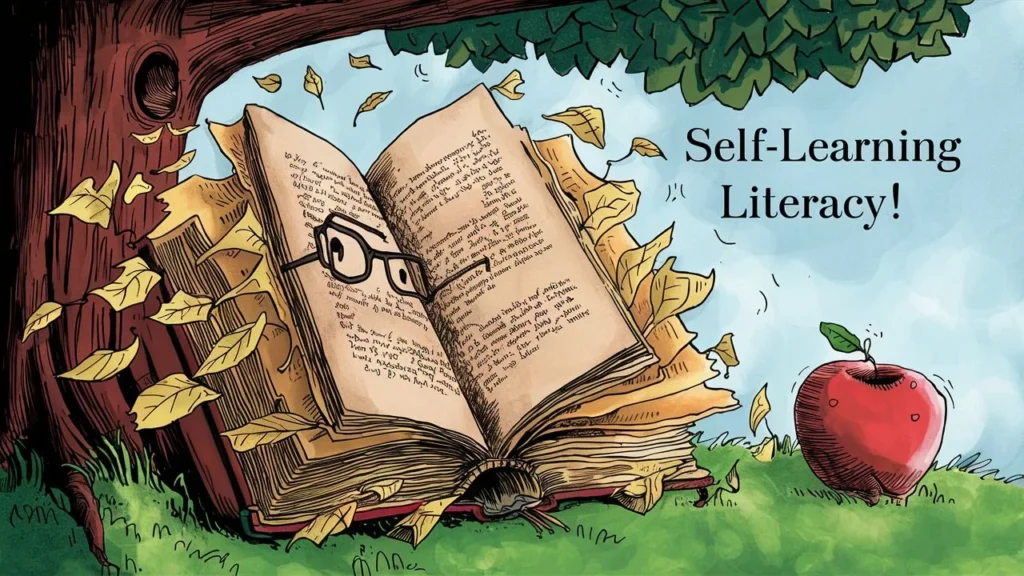
- A book reading itself under a tree, with an apple looking on in surprise, with “Self-Learning Literacy!” as the caption.
- A snail racing a cheetah, with the snail surprisingly ahead, and “Speed is Relative!” written below.
- A fridge exploring a snowy mountain, with a flag that reads “Cool Adventures Await!”
I generated images for each prompt in Ideogram. The results were delightfully absurd and proved this tool can bring even the most nonsensical concepts to life.




How Ideogram 1.0 Stacks Up Against the Competition
Of course, I had to see how this exciting new version of Ideogram measured up against other popular AI image generators. For comparison, I tested out DALL-E 3 and Stable Diffusion using the same set of 10 random prompts from ChatGPT.
All three tools were able to generate coherent images for the unusual prompts. However, I noticed some key differences between them:
Detail and Precision – Ideogram’s images were highly detailed, capturing even tiny elements like text on small signs or subtle background objects. Dall-E images were also very intricate but sometimes distorted tiny details. Stable Diffusion tended to lack fine details compared to the other two.
Readable Text – As mentioned before, Ideogram rendered text clearly and accurately. Dall-E struggled a bit more with text legibility, though it was decipherable. Stable Diffusion text often came out blurry or wavy.
Creative Interpretation – I felt Ideogram and Dall-E took more creative license when interpreting the prompts. The images aligned with the text but put unique twists on each concept. Stable Diffusion seemed to interpret prompts more literally.
Polished Graphics – Ideogram’s outputs really stood out to me as polished graphics you could use right away. The images look like professional social media posts or YouTube thumbnails with no editing needed. Dall-E and Stable Diffusion have more of an artistic, painted look.
Usage Limits – Both Ideogram and Stable Diffusion offer free tiers, while Dall-E is currently limited access. However, Ideogram’s free plan is capped at 100 images daily. Stable Diffusion is fully unlimited.
Overall, I was wowed by how Ideogram 1.0 compared to these heavyweight competitors. While they all have impressive capabilities, Ideogram’s precision, creativity, and instantly usable images give it an edge in my book. I’m excited to see where it goes from here.
Ideogram VS Dalle-3 Vs Stable Cascade


Ideogram’s Unique Strengths and Capabilities
Beyond readable text, Ideogram 1.0 has other advantages that make it stand out:
- Intuitive interface with built-in prompt settings
- Ability to upload images along with text prompts
- Multiple aspect ratio options for generating social media-ready images
- “Magic prompt” feature for automatic prompt enhancements
With the paid monthly plans, you also get perks like png outputs, private generations, priority access to new features, and more daily image generations.
Turning AI Images Into Real-World Value
Ideogram 1.0 has awesome potential for generating graphics and images that can be turned into tangible value. Here are some of the real-world applications that excite me:
YouTube Thumbnails – As I mentioned, Ideogram outputs have a polished, graphical look perfect for YouTube video thumbnails. You can quickly generate customized, eye-catching thumbnails for each video by describing the content in a prompt. This helps attract viewers.
T-Shirt Designs – The tool’s ability to cleanly render text makes it great for creating t-shirt designs centered around phrases, quotes, or funny inside jokes. Generate a mockup image, then order the shirts through print-on-demand services like Teespring to sell.
Social Media Images – Quickly create interesting images to use for Instagram posts, Facebook ads, Twitter headers, LinkedIn updates, and more. Tailor the image content and text for each platform’s audience.
Illustrations – Generate unique illustrations to use on websites, in blog posts, presentations, books and beyond. Add your own text captions to explain or enhance the images.
Logos – Ideogram could potentially help design logos by generating iconography and text together in one cohesive image. Much faster than traditional logo design!
Book Covers – Combine great imagery with compelling text snippets to create eye-catching book cover designs in any genre. The AI-generated imagery cuts down on time spent finding stock photos.
Infographics – Develop informative and shareable infographics rapidly. Start with a text description of the data or information, and let Ideogram visualize it for you in an infographic format.
The possibilities are truly endless. Whatever your creative endeavor, consider how Ideogram 1.0 could help generate engaging, customized imagery that translates into real value for you or your business. The AI does the hard work so you can reap the rewards!
Have you tried Ideogram 1.0 or similar AI image generators? I’d love to hear about your experience in the comments!
if you’re looking for an underdog FREE AI video generator? check this out: